

Profit and cash are not the same. A business can be profitable and still run out of money when customers pay late. A cash flow forecast shows that gap early. The numbers in the sample are made up.
How the template works
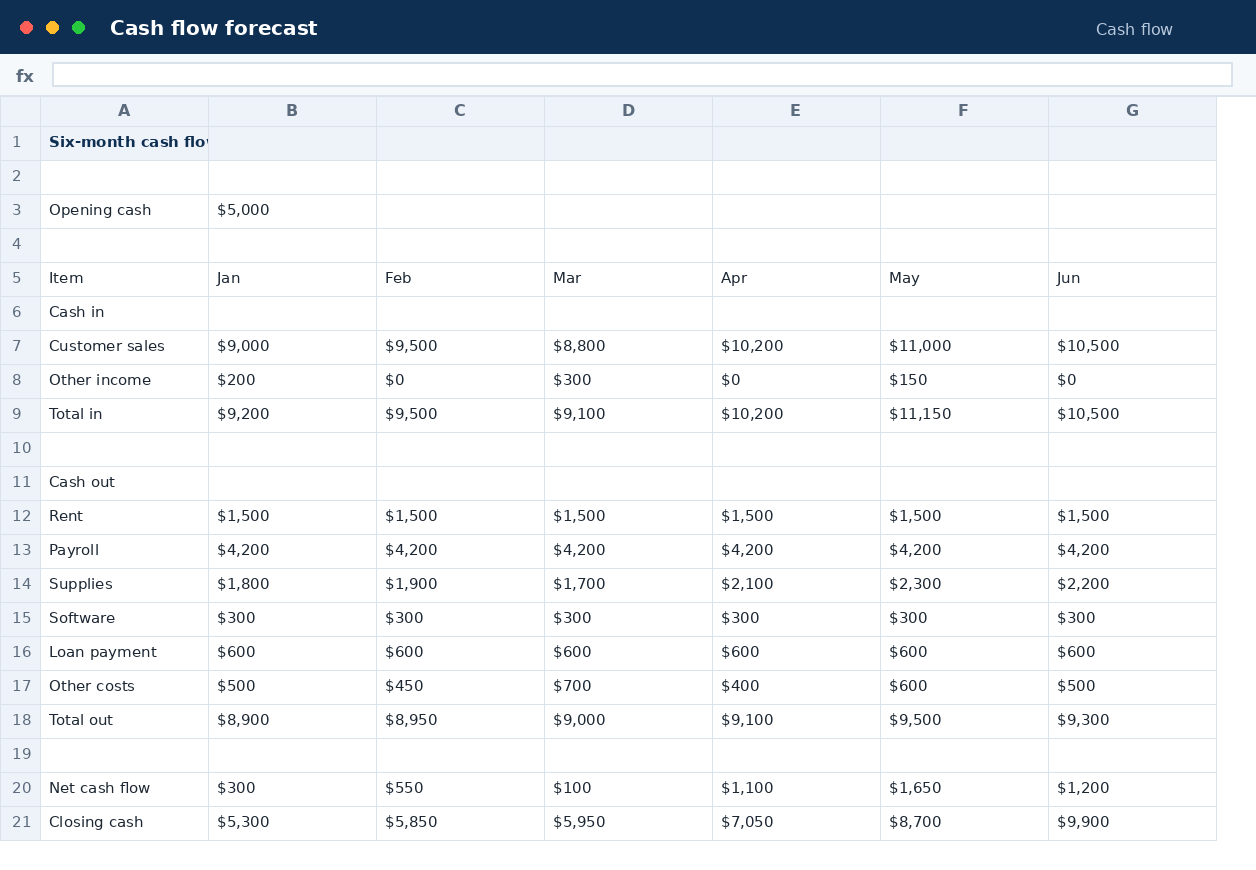
The Cash flow sheet has opening cash in B3, a block for cash in, a block for cash out and two result rows. Total in and total out use =SUM(). Net cash flow is total in minus total out. Closing cash is the previous closing cash plus net cash flow, and January starts from the opening cash in B3. In the sample, closing cash grows from $5,300 in January to $9,900 in June.
How to use it
1. Download the xlsx. 2. Type your real opening cash in B3. 3. Enter expected cash in by month. Use the date money will arrive, not the date you invoice. 4. Enter cash out, including loan payments and tax. 5. Look for red closing balances and plan for them, for example by chasing invoices or delaying a purchase.
Tips for a useful forecast
Be cautious about income and generous about costs. Update the forecast monthly with actuals. Keep it to six to twelve months; further out is guesswork.
Related
To report past cash flow, see how to build a cash flow statement in Google Sheets. For day-to-day records, use the free bookkeeping Excel template. More files: Excel templates for small business.
Download the free template
The bottom line
A forecast is a plan, not a promise. Its value is that a shortfall shows up on screen months before it shows up in your bank account.