
Freelance income arrives in uneven pieces. Some invoices are paid on time and others sit for weeks. A single list shows how much you have earned and how much you are still waiting for. The clients and amounts below are made up for the example.
How the freelance income tracker works
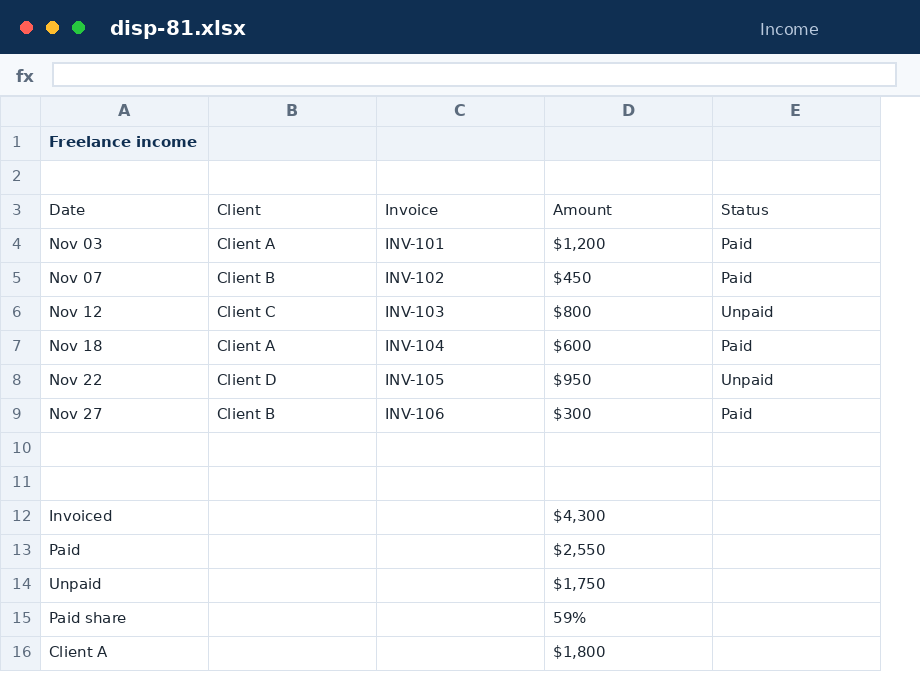
The Income sheet has a row per invoice with the date, client, invoice number, amount and status. Invoiced is =SUM(D4:D9). Paid is =SUMIF(E4:E9,"Paid",D4:D9), and Unpaid uses the same formula with "Unpaid". Paid share is =ROUND(D13/D12,2), formatted as a percentage. A client total is =SUMIF(B4:B9,"Client A",D4:D9).
In the sample, you invoiced $4,300. Of that, $2,550 is paid and $1,750 is unpaid, so 59% has been paid. Client A is the biggest client at $1,800.
Chase the unpaid ones
The Unpaid total is the number to watch. In the sample, Client C owes $800 and Client D owes $950. Filter the Status column to Unpaid to see who to follow up with. Taxes are not part of this sheet, so keep a separate record for them and ask a local tax adviser what applies to you.
How to use it
1. Download the xlsx and upload it to Google Drive, or open it in Excel. 2. Replace the sample rows with your own invoices. 3. Set Status to Paid when the money arrives. 4. Read the summary at the bottom. 5. Add rows and extend the ranges, for example D4:D30.
Related
Work out what to charge with the freelance rate calculator, see more tools in the best free Google Sheets templates for freelancers and plan your spending with the free Google Sheets budget template.
Download the free income tracker
The bottom line
Record every invoice and mark it paid when the money lands. The unpaid total tells you who to follow up with.