
Many freelancers pick a rate by looking at what others charge. A better start is your own numbers. You do not bill 40 hours a week: part of the week goes on admin, sales and gaps between jobs. All figures in the sample are examples.
How the freelance rate calculator works
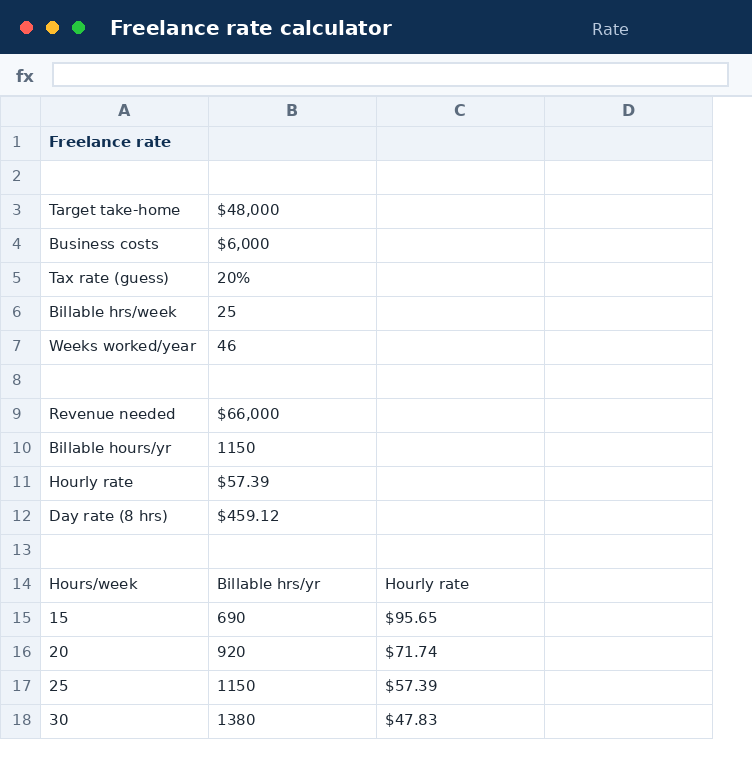
Enter five inputs in B3:B7: target take-home pay, business costs, a tax rate guess, billable hours per week and weeks worked per year. Revenue needed is =B3/(1-B5)+B4. Billable hours per year is =B6*B7. Hourly rate is =ROUND(B9/B10,2), and the day rate is =ROUND(B11*8,2).
In the sample, a $48,000 take-home, $6,000 of costs and a 20% tax guess means $66,000 of revenue. At 25 billable hours a week for 46 weeks (1,150 hours), the hourly rate is $57.39 and the 8-hour day rate is $459.12.
Why billable hours change everything
The table under the results keeps everything else the same and changes only the billable hours. At 15 hours a week the rate is $95.65. At 20 it is $71.74. At 25 it is $57.39, and at 30 it is $47.83. Be honest about your billable hours, because that is the number that moves the rate most.
How to use it
1. Download the xlsx. 2. Enter the pay you need to take home. 3. Add your yearly costs, such as software, equipment and insurance. 4. Use a tax rate your accountant gives you. The 20% here is a placeholder, not advice. 5. Count weeks off, sick days and holidays when you set weeks worked.
Related
See the best free Google Sheets templates for freelancers. Chase payments with the invoice tracker, and log business driving with the mileage log.
Download the free calculator
The bottom line
Treat the result as a floor, not a price. Your market, your skills and your clients decide what you can charge above it.