

If you drive for work, you may be able to claim back the cost, and a clear log makes that much easier. The trips in the sample are made up.
How the template works
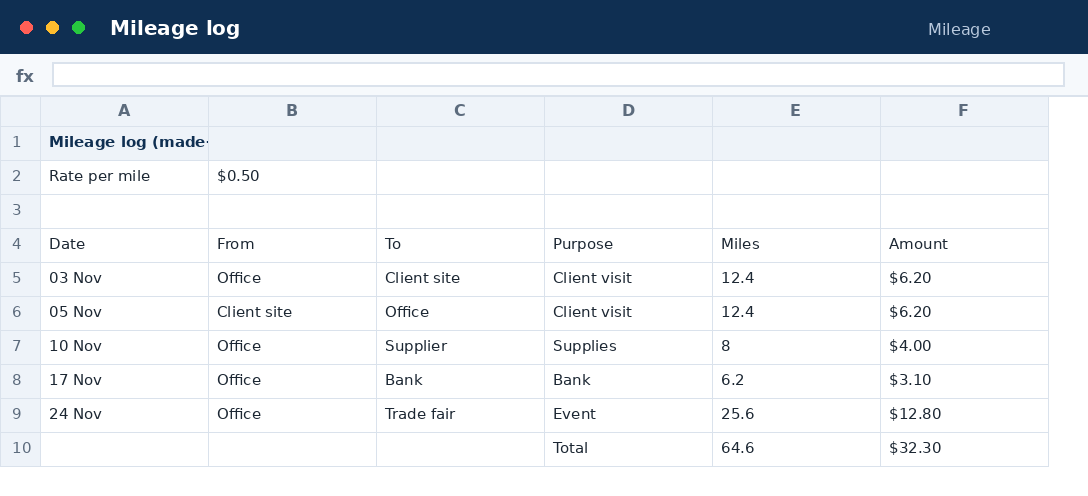
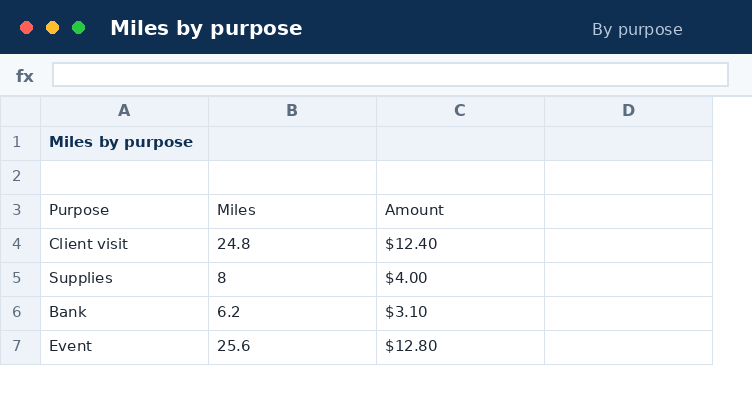
The Mileage sheet has a rate per mile in B2, then one row per trip with Date, From, To, Purpose, Miles and Amount. Amount is =E5*$B$2. Totals use =SUM(). The By purpose sheet uses =SUMIF() to total miles for each purpose and multiplies by the rate. In the sample, five trips add up to 64.6 miles and $32.30 at an example rate of $0.50 per mile. Client visits account for 24.8 miles, supplies 8.0, the bank 6.2 and the trade fair 25.6.
Which rate should you use?
The $0.50 in the sample is only an example. The rate depends on your employer or your tax authority, and it changes, so look up the current figure for your country before you claim anything. Type it into B2 and every amount updates.
How to use it
1. Download the xlsx. 2. Set your rate in B2. 3. After each trip, add the date, start, destination, purpose and miles. 4. Check the By purpose sheet at month end. 5. Keep odometer readings or map distances as backup.
Related
Turn trips into a claim with the expense report template. Track other costs in the small business expense tracker. More files: Excel templates for small business.
Download the free template
The bottom line
Log the trip the day it happens. Reconstructing a month of driving from memory is where mistakes creep in.