

For a team of a few people, a spreadsheet is often enough to prepare a pay run. Be clear about the limit, though: tax and social contribution rules differ by country and by person, so the deduction in this file is a flat placeholder. Ask your accountant or payroll provider for the real figures. All names, hours and rates in the sample are made up.
How the payroll sheet works
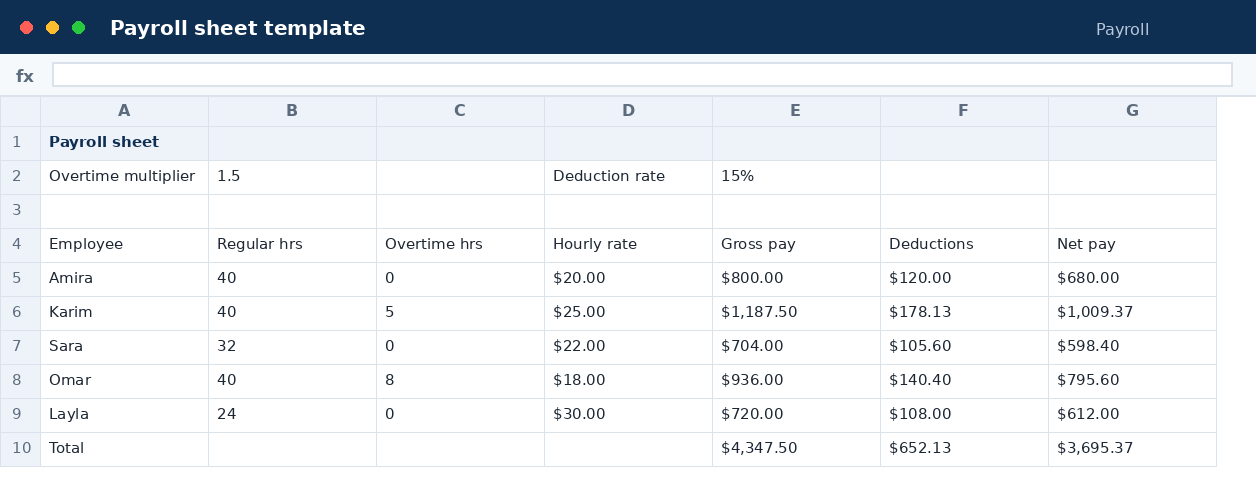
Two inputs sit at the top of the Payroll sheet: the overtime multiplier in B2 (1.5 in the sample) and the deduction rate in E2 (15% in the sample). Both are examples, not advice. Each row then has Regular hrs, Overtime hrs and Hourly rate. Gross pay is =B5*D5+C5*D5*$B$2. Deductions are =ROUND(E5*$E$2,2), and Net pay is =E5-F5.
In the sample, five people have a total gross pay of $4,347.50. Deductions come to $652.13 and net pay to $3,695.37. Karim, with 5 overtime hours at $25.00, earns $1,187.50 gross ($1,000.00 regular plus $187.50 overtime).
How to use it
1. Download the xlsx. 2. Set the overtime multiplier for the rule that applies where you operate. 3. Replace the sample rows with your team. 4. Replace the flat deduction rate with the figure your accountant gives you, or split it into separate columns if you need more detail. 5. Keep a copy of each month under its own name so you have a record.
The ROUND function keeps deductions to whole cents, so the totals match what you would pay out.
Related
Paying commission as well? See the sales commission calculator. Track other running costs in the small business expense tracker. More files: Excel templates for small business.
Download the free template
The bottom line
Use the sheet to prepare and check the numbers, and let a professional confirm the tax side. Hours and rates are the part you control, so get those right first.