
If you rent out a few units, the monthly question is simple: who has paid and who has not? A short sheet answers it at a glance. The units, tenants and amounts in the sample are made up.
How the rental income tracker works
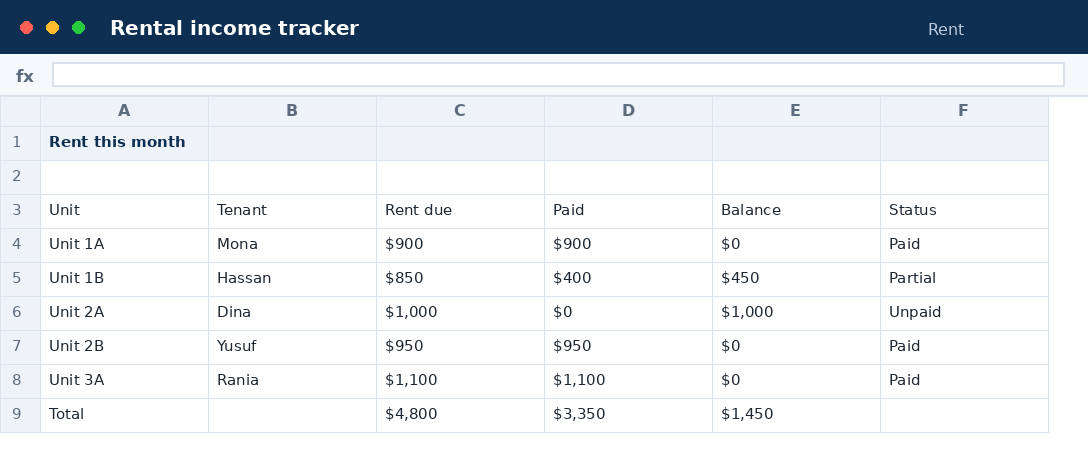
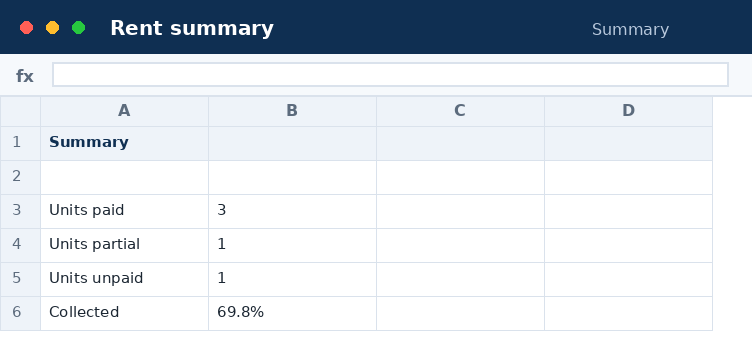
The Rent sheet has Unit, Tenant, Rent due, Paid, Balance and Status. Balance is =C4-D4. Status is =IF(D4>=C4,"Paid",IF(D4=0,"Unpaid","Partial")). The Summary sheet counts each status with =COUNTIF() and works out the share collected with =SUM(Rent!D4:D200)/SUM(Rent!C4:C200).
In the sample, five units have $4,800 of rent due and $3,350 paid, which leaves $1,450. Three units are paid, one is partial (Unit 1B, $450 short) and one is unpaid (Unit 2A, $1,000). The share collected is 69.8%.
How to use it in Google Sheets
1. Download the xlsx and open it with Google Sheets. 2. Replace the sample units and tenants. 3. Enter each month's rent due. 4. As payments arrive, type the amount in Paid. 5. Make a copy of the sheet for each new month so you keep a record.
This tracks rent only. Keep repair and other costs in a separate expense sheet, and ask your accountant how rental income is taxed where you live.
Related
Chasing unpaid amounts? Use the invoice tracker. Log costs with the Google Sheets expense tracker, or plan your month with the free Google Sheets budget template.
Download the free template
The bottom line
Update Paid the day money arrives. A partial payment you forgot to record is the one that causes an awkward conversation later.