

Leads go cold when nobody writes down the next step. The fix is a short list you read every morning. All names, companies and amounts below are made up.
How the CRM follow-up tracker works
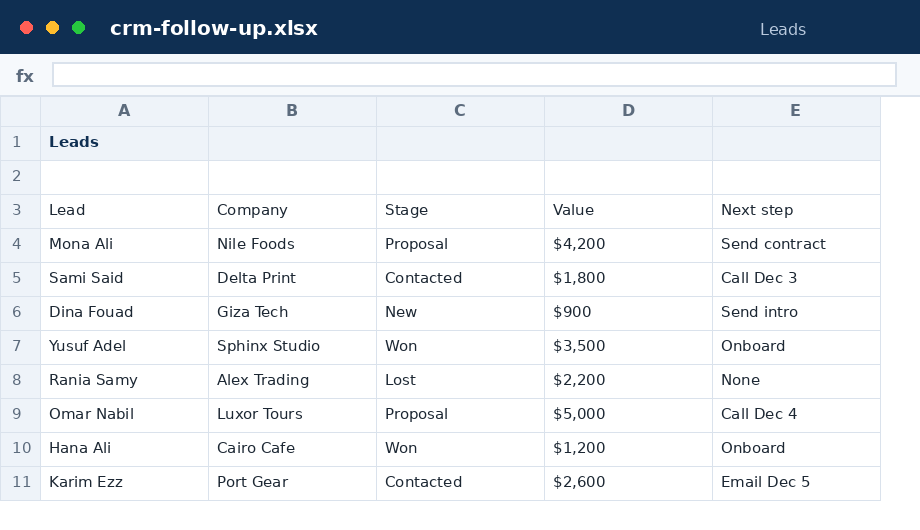
The Leads sheet has one row per lead: name, company, stage, deal value and next step. The stage is New, Contacted, Proposal, Won or Lost. The Summary sheet counts them. Leads is =COUNTA(Leads!A4:A200). Open value is =SUMIFS(Leads!D4:D200,Leads!C4:C200,"<>Won",Leads!C4:C200,"<>Lost"), which adds every lead that is not yet won or lost.
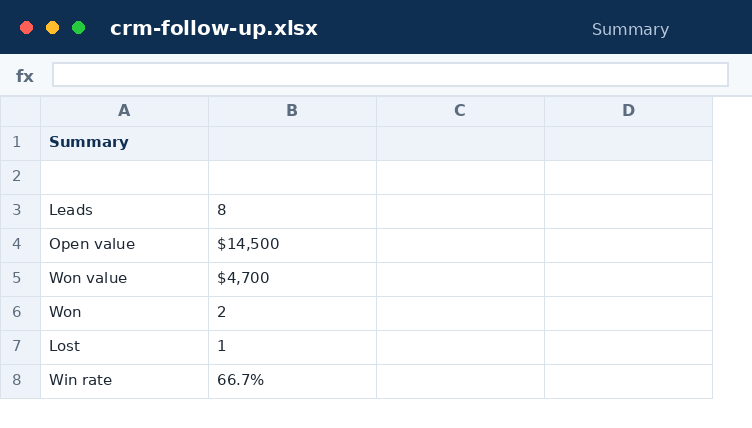
In the sample there are 8 leads. Open value is $14,500 across 5 leads, and won value is $4,700 from 2 deals.
Win rate
Win rate is =ROUND(B6/(B6+B7),3): deals won divided by deals won plus deals lost. Two wins and one loss give 66.7%. Leads still open are left out, because they have not been decided yet. With so few deals the number moves a lot, so read it as a rough guide.
How to use it
1. Download the xlsx and upload it to Google Drive, or open it in Excel. 2. Replace the sample leads with yours. 3. Use exactly New, Contacted, Proposal, Won or Lost, because the formulas read those words. 4. Write a clear next step for every open lead, with a date if you can. 5. Open the sheet each morning and work down the open leads.
Related
Keep contacts in the customer list template. For a board-style view, see the sales pipeline tracker. Work out pay with the sales commission calculator.
Download the free tracker
The bottom line
Start simple. If the list gets too long for a sheet, that is a good sign you may be ready for a proper CRM.