
You do not need a CRM to keep track of a few dozen customers. You need one list that is easy to filter and always up to date. The customers, companies and email addresses in the sample are made up.
How the customer list template works
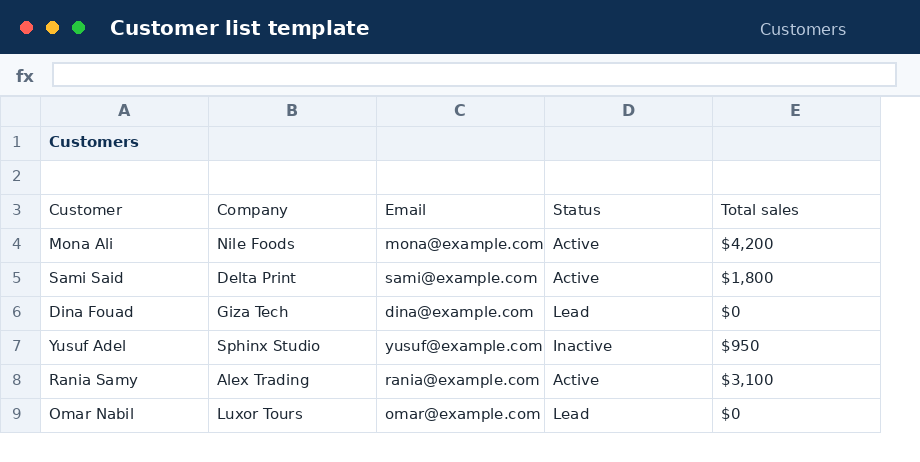
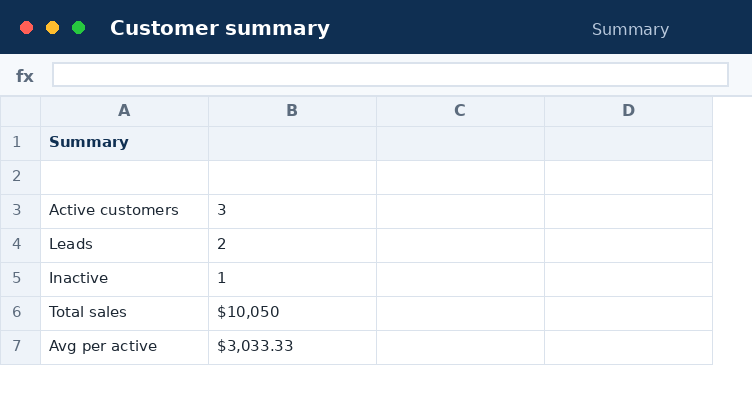
The Customers sheet has Customer, Company, Email, Status and Total sales. The Summary sheet counts statuses with =COUNTIF(Customers!D4:D500,"Active"), totals sales with =SUM() and finds the average per active customer with =ROUND(SUMIF(...)/COUNTIF(...),2).
In the sample, six customers include 3 active, 2 leads and 1 inactive. Total sales are $10,050, and the three active customers average $3,033.33 each.
How to use it in Google Sheets
1. Download the xlsx and open it with Google Sheets. 2. Replace the sample rows with your customers. 3. Type Lead, Active or Inactive in Status, spelled exactly like that. 4. Turn on a filter (Data, Create a filter) to see one status at a time. 5. Update Total sales after each sale.
Keep it to what you need
Store only the details you will use, and follow the privacy rules for customer data where you work. Share the sheet only with people who need it.
Related
Move leads forward with the sales pipeline tracker. Book calls with the client appointment schedule. More files: Excel templates for small business.
Download the free template
The bottom line
A customer list is only useful if it is current. Update Status the same day something changes, and review it once a month.