
The snowball method means paying off the smallest balance first while paying minimums on the rest. When that debt is gone, its payment moves to the next one. The debts and amounts in the sample are made up.
How the debt snowball tracker works
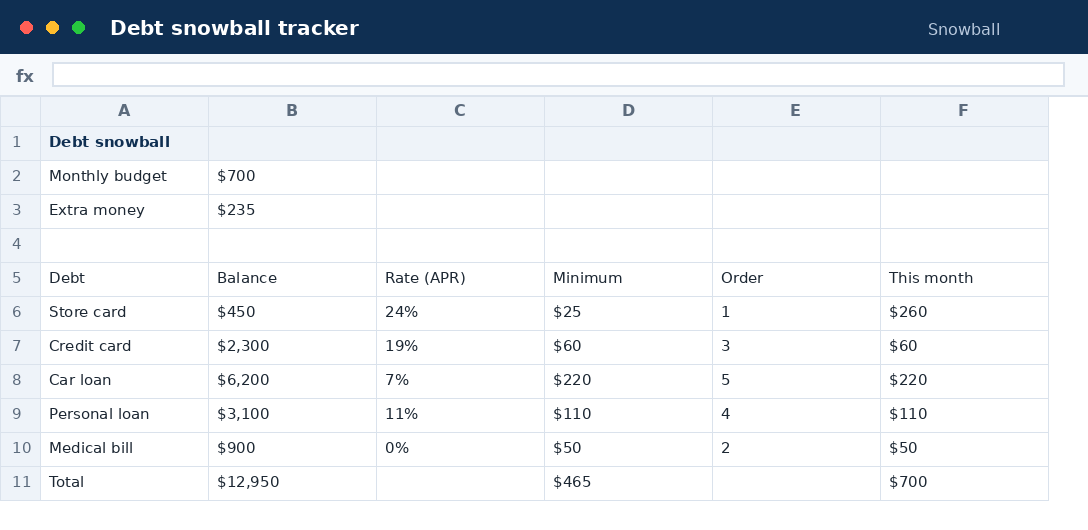
Set your monthly budget for debt in B2. The sheet lists each debt with Balance, Rate (APR) and Minimum. Extra money is =B2-D11, the budget minus all minimums. Order is =RANK(B6,$B$6:$B$10,1), which gives 1 to the smallest balance. This month's payment is =D6+IF(E6=1,$B$3,0), so only the debt ranked 1 gets the extra.
In the sample, five debts add up to $12,950 and the minimums add up to $465. With a $700 budget, $235 is extra. The store card has the smallest balance ($450), so it gets $25 plus $235, which is $260. The other four stay at their minimums, and the payments total $700.
How to use it in Google Sheets
1. Download the xlsx and open it with Google Sheets. 2. Enter your monthly debt budget. It needs to cover at least the minimums. 3. Replace the sample debts with yours. 4. Pay what the This month column says. 5. Update balances from your statements, and when a debt hits $0, the next one moves up to order 1.
Snowball or avalanche?
The snowball order is by balance, which gives early wins. The avalanche method pays the highest rate first, and it usually costs less interest. In the sample, the store card has both the smallest balance and the highest rate (24%), so the two methods agree for the first step. Pick the one you will keep doing.
Related
See the Google Sheets budget template for credit card debt, estimate one loan with the loan payoff tracker, or plan your month with the free Google Sheets budget template.
Download the free template
The bottom line
Keep the monthly budget the same even as debts disappear. That is the whole trick: the freed-up money rolls to the next debt.