
A goal feels real once it has a date. This template turns "I want to save $6,000" into "June 2028 at $300 a month". The amounts and dates in the sample are made up, and the template does not include interest.
How the template works
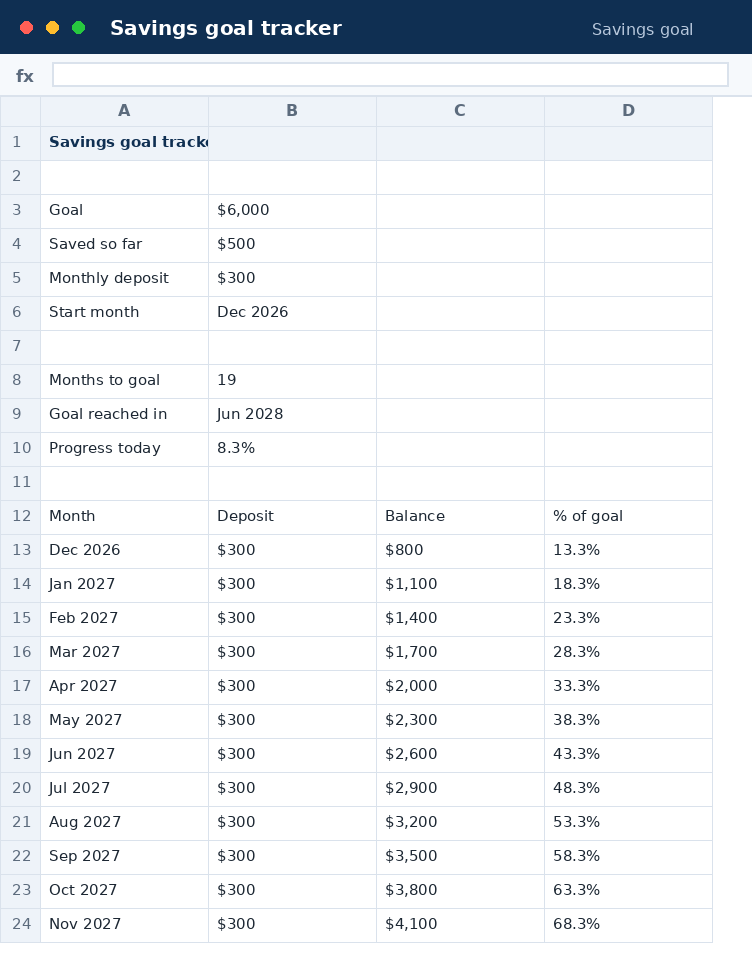
The Savings goal sheet has four inputs: goal, saved so far, monthly deposit and start month. Months to goal is =IF(B5<=0,"Set a deposit",MAX(0,ROUNDUP((B3-B4)/B5,0))). Goal reached in is =IF(ISNUMBER(B8),EDATE(B6,B8-1),""). Progress today is saved divided by goal. Below that, a 12-month table lists each month, the deposit, the running balance and the share of the goal reached. In the sample, a $6,000 goal with $500 saved and $300 a month takes 19 months, ending June 2028. Progress today is 8.3%.
How to use it in Google Sheets
1. Download the xlsx and choose File > Import. 2. Enter your goal, current savings and monthly deposit. 3. Set the first month you will deposit. 4. Read the target month. 5. Try a larger deposit to see how much sooner you get there.
What about interest?
The template ignores interest to keep the numbers simple. If your account pays interest, you will reach the goal a little sooner than shown. Use the result as a safe estimate.
Related
Find the money with the free Google Sheets budget template. Saving on a student income? See the college student budget template. Saving as a household? Try the family budget template.
Download the free template
The bottom line
Set the deposit you can keep up, not the one that looks best on paper. A smaller plan you follow beats a bigger one you drop.