
Task lists tell you what is left to do. They do not tell you whether you can still afford it. This template tracks the money side. The projects, names and amounts in the sample are made up.
How the project tracker works
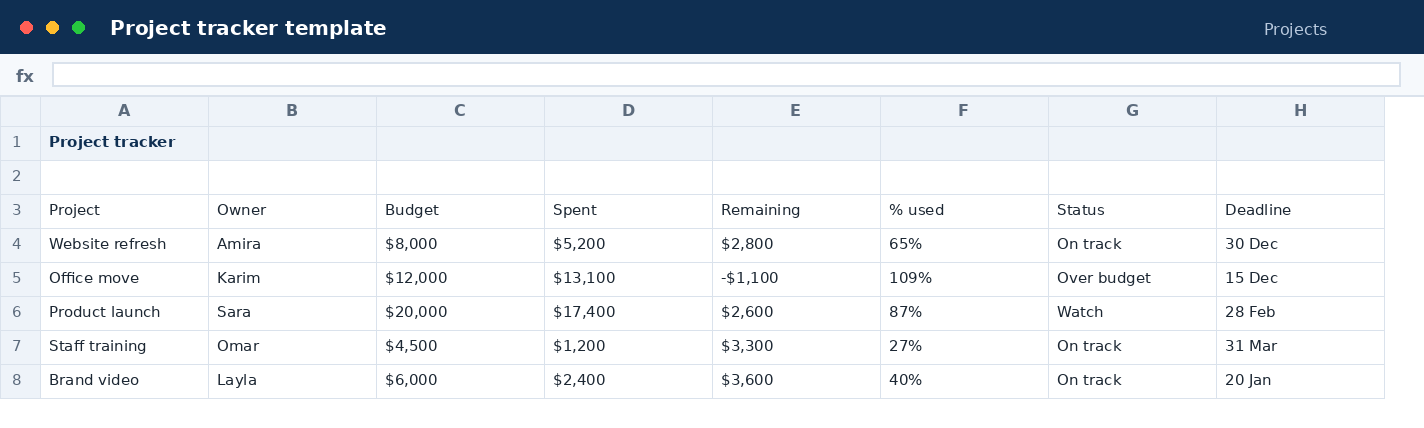
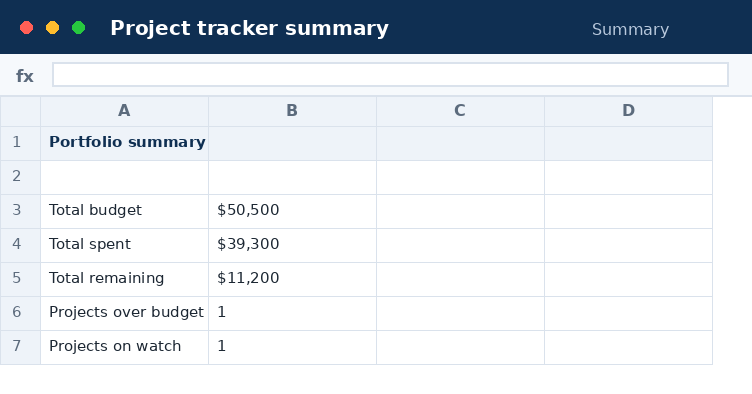
The Projects sheet has one row per project: Project, Owner, Budget, Spent, Remaining, % used, Status and Deadline. Remaining is =C4-D4 and % used is =D4/C4. Status uses =IF(F4>1,"Over budget",IF(F4>=0.8,"Watch","On track")). The Summary sheet adds everything up with =SUM() and counts statuses with =COUNTIF().
In the sample, five projects have a total budget of $50,500 and $39,300 spent, which leaves $11,200. The office move is over budget by $1,100 (109% used), and the product launch is on watch at 87%.
How to use it in Google Sheets
1. Download the xlsx and upload it to Google Drive, then open it with Google Sheets. 2. Replace the sample rows with your projects. 3. Update Spent each week. 4. Copy the Remaining, % used and Status formulas down for new rows. 5. Check the Summary sheet before any budget meeting.
If 80% is too early or too late for you, change the 0.8 in the Status formula.
Related
Need a task-level view? Try the project management template. Track day-to-day costs with the small business expense tracker. More files: Excel templates for small business.
Download the free template
The bottom line
Update the Spent column on a fixed day each week. A tracker that is a month out of date is worse than none.