
Meetings go wrong in two ways. They run over, and nobody remembers the actions afterwards. Both are easy to see in a sheet. Every name, topic and date below is made up for the example.
How the meeting agenda tracker works
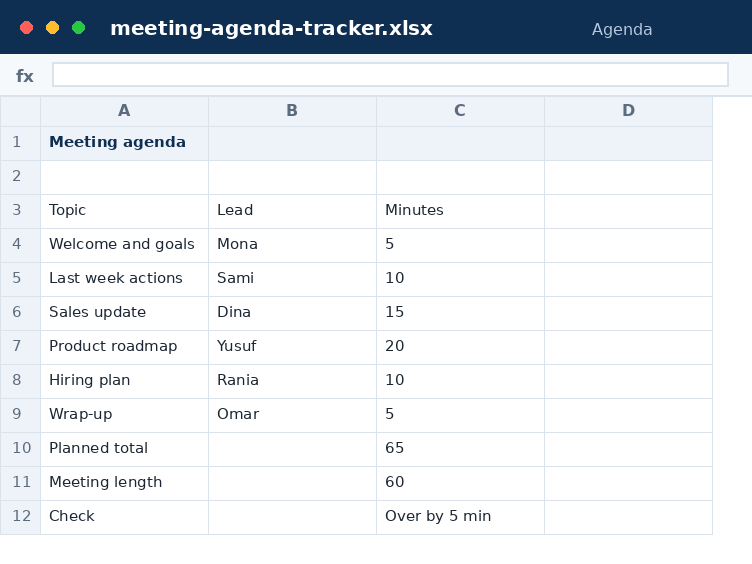
The Agenda sheet lists each topic, who leads it and how many minutes it gets. The planned total is =SUM(C4:C9). You set the meeting length in C11, and the check cell uses =IF(C10>C11,"Over by "&(C10-C11)&" min","Fits").
In the sample, six topics add up to 65 minutes for a 60-minute meeting, so the check says "Over by 5 min". That is the cue to trim a topic before the meeting, not during it.
Track actions after the meeting
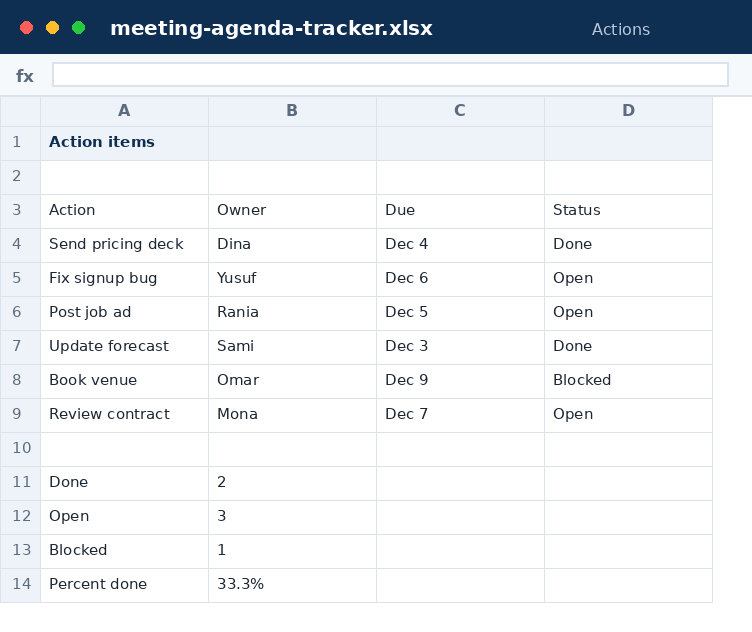
The Actions sheet logs each action with an owner, a due date and a status of Open, Done or Blocked. Use those exact words, because the counts use =COUNTIF(D4:D9,"Done") and the same pattern for the other two. In the sample, 2 actions are done, 3 are open and 1 is blocked, so 33.3% are done (=ROUND(B11/COUNTA(A4:A9),3)).
How to use it
1. Download the xlsx and upload it to Google Drive, or open it in Excel. 2. Replace the sample topics with yours. 3. Set the meeting length and check the result. 4. After the meeting, add each action with an owner and a date. 5. Open the Actions sheet at the start of the next meeting and go through anything still Open or Blocked.
Related
For bigger work, see the project management template for Google Sheets. Compare tools in ClickUp vs Monday.com, or browse more Excel templates for small business.
Download the free tracker
The bottom line
Check the timing before the meeting and review the actions at the start of the next one. Those two habits do most of the work.