
Laptops, desks, vehicles and cameras all lose value, and you need a list of what you own and what it is worth on paper. An asset register is that list. The assets and amounts in the sample are made up.
How the asset register works
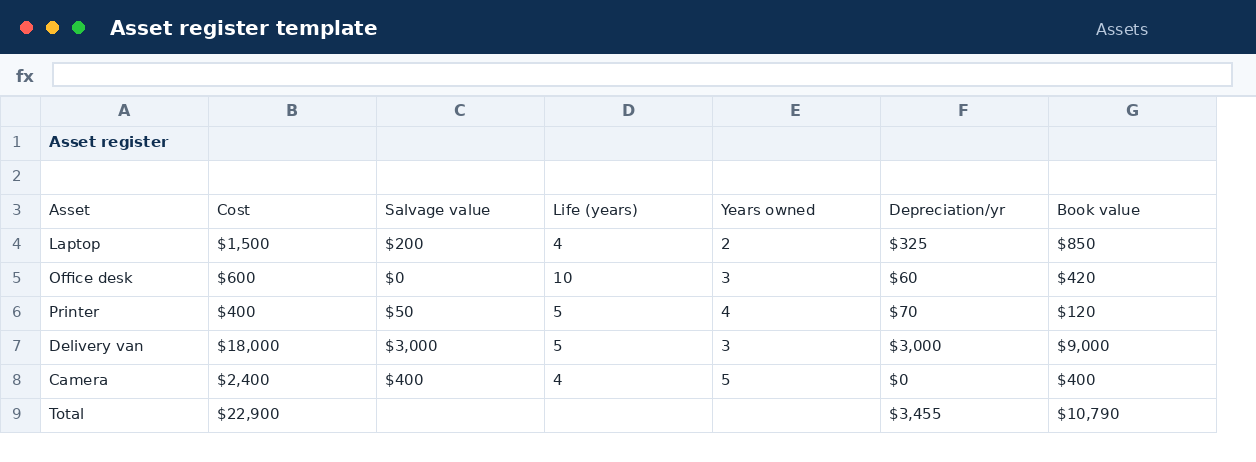
The Assets sheet has one row per item: Asset, Cost, Salvage value, Life (years), Years owned, Depreciation/yr and Book value. Depreciation per year uses the straight-line method: =IF(E4>=D4,0,(B4-C4)/D4). It drops to 0 once the years owned reach the life. Book value is =MAX(C4,B4-(B4-C4)/D4*E4), which never goes below the salvage value.
In the sample, five assets cost $22,900 in total. This year's depreciation is $3,455 and the total book value is $10,790. The laptop costs $1,500 with a $200 salvage value over 4 years, so it loses $325 a year and is worth $850 after 2 years. The camera has been owned for 5 years against a 4-year life, so it sits at its $400 salvage value.
How to use it
1. Download the xlsx. 2. Replace the sample rows with your assets. 3. Enter the salvage value you expect at the end of the asset's life, or 0. 4. Update Years owned once a year. 5. Add a row for each new purchase and copy the two formulas down.
Keep tax and tracking separate
Tax rules for depreciation differ by country and by type of asset, and they may not match straight-line. Use this sheet to track what you own, and ask your accountant which figures belong in a tax return.
Related
Buying something new? Use the purchase order template. Track stock with the Excel inventory template with reorder alerts. More files: Excel templates for small business.
Download the free template
The bottom line
Do a quick walk-through once a year and match the register to what you actually have. Items that were sold or broken still show up until someone removes them.