

Gift money disappears in small amounts. A $34 gift here and a $68 one there, and the total is higher than you meant. A short list with a limit per person keeps it visible. All names and amounts below are made up.
How the holiday gift budget template works
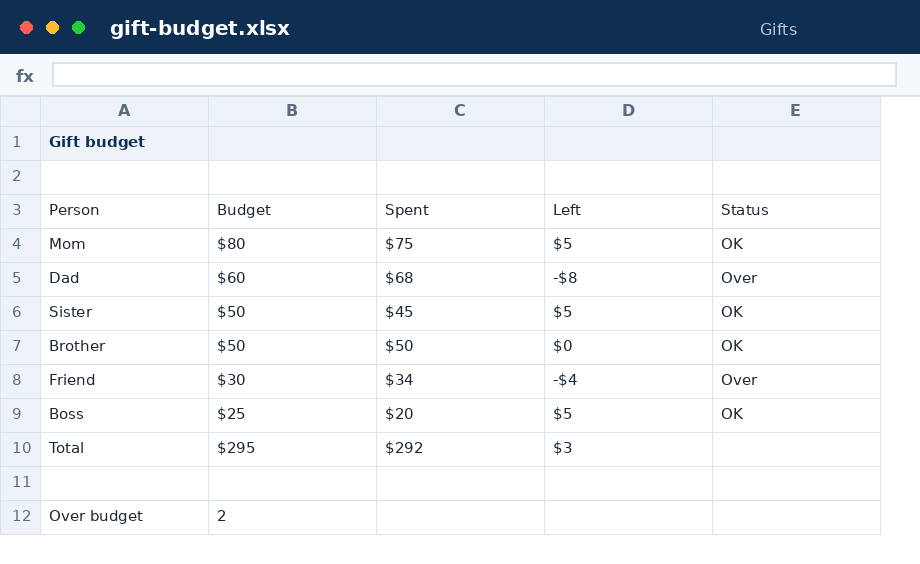
The Gifts sheet has one row per person with a budget, the amount spent, what is left and a status. Left is =B4-C4, so a negative number means you spent more than planned. Status is =IF(C4>B4,"Over","OK"). The Total row adds each column, and the over budget count is =COUNTIF(E4:E9,"Over").
In the sample, the total budget is $295 and $292 has been spent, so $3 is left. Two gifts are over: Dad by $8 ($68 against $60) and Friend by $4 ($34 against $30).
Why the total can hide a problem
The sample total is under budget by $3, yet two people got more than planned. Other gifts came in under their limits and covered the gap. That works once. The per-person status shows you where the plan is slipping, which the total alone does not.
How to use it
1. Download the xlsx and upload it to Google Drive, or open it in Excel. 2. List everyone you buy for and set a limit for each. 3. Add the amount in Spent each time you buy. 4. Watch the Status column. 5. Before the last purchases, check the Total row and move budget between people if you need to.
Related
Planning a party too? Try the event budget template. For the whole month, use the free Google Sheets budget template, and plan the festive dinners with the weekly meal planner.
Download the free gift budget
The bottom line
Decide the limits first and write down every purchase. Then there are no surprises in the new year.