

Deciding what to cook each night is a daily chore. Planning the week once makes shopping faster and often cheaper. The meals and costs below are made up for the example.
How the weekly meal planner works
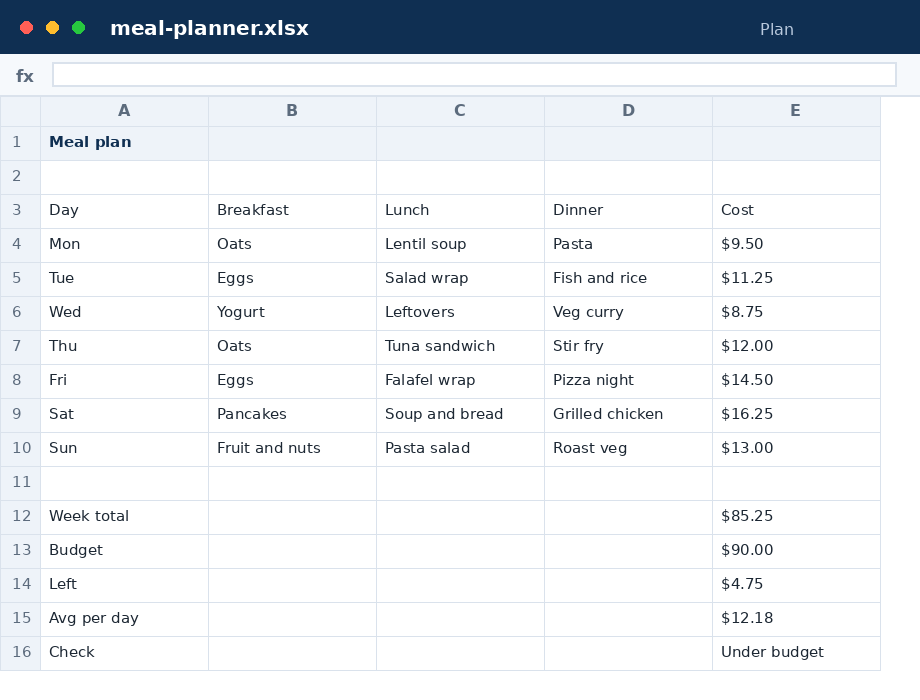
The Plan sheet has a row for each day and a column for breakfast, lunch and dinner. The last column is your estimated food cost for that day. Week total is =SUM(E4:E10). Left is =E13-E12, where E13 holds your budget. Average per day is =ROUND(E12/COUNTA(A4:A10),2), and Check is =IF(E12>E13,"Over","Under budget").
In the sample, the week costs $85.25 against a $90.00 budget. That leaves $4.75, an average of $12.18 a day, and the check says Under budget.
Where the money goes
Friday ($14.50) and Saturday ($16.25) cost the most in the sample, because of the pizza night and the grilled chicken. Wednesday is the cheapest at $8.75, helped by leftovers for lunch. Planning leftovers on purpose is one of the simplest ways to bring the weekly total down.
How to use it
1. Download the xlsx and upload it to Google Drive, or open it in Excel. 2. Type your meals for each day. 3. Add a rough cost for the day. Your usual shop receipts give a good guide. 4. Set your weekly budget in the Budget cell. 5. Make your shopping list from the plan, then copy the file for next week.
Related
See the whole picture with the free Google Sheets budget template or the family budget template. Build routines with the habit tracker.
Download the free meal planner
The bottom line
Plan once, shop once, and check the total. Even a rough cost per day shows you where the food budget goes.