

A habit tracker works best when it takes ten seconds a day. A grid of ones and zeros is about as simple as it gets, and the sheet does the counting. The habits and check marks below are made up.
How the habit tracker template works
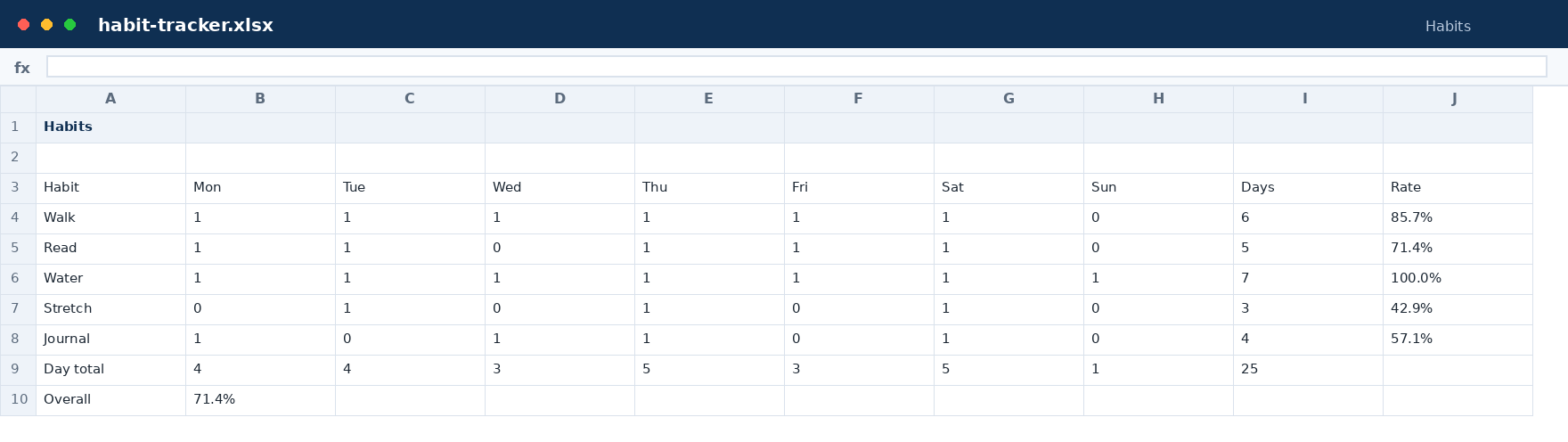
Each row is a habit and each column is a day from Monday to Sunday. Enter 1 when you did it and 0 when you did not. Days in column I is =SUM(B4:H4). Rate in column J is =ROUND(I4/7,3), shown as a percentage. The Day total row adds each day, and the Overall cell is =ROUND(I9/(COUNTA(A4:A8)*7),3).
In the sample, Water was done all 7 days (100.0%), Walk 6 days (85.7%), Read 5 days (71.4%), Journal 4 days (57.1%) and Stretch 3 days (42.9%). That makes 25 check marks out of 35, an overall rate of 71.4%.
What the totals tell you
The Day total row shows which days slip. Thursday and Saturday were the best days with 5 habits each. Sunday had only 1. If one day is always weak, change the plan for that day instead of blaming yourself. You might do the habit earlier, or drop the habit with the lowest rate for a while.
How to use it
1. Download the xlsx and upload it to Google Drive, or open it in Excel. 2. Replace the sample habits with your own. Keep the list short, five or fewer. 3. Fill in each day, using only 1 or 0. 4. Read the Rate column at the end of the week. 5. Copy the file for the next week and clear the numbers.
Related
Put numbers on a target with the savings goal tracker. Run your team check-ins with the meeting agenda tracker, or browse more Excel templates for small business.
Download the free habit tracker
The bottom line
Track fewer habits and check the sheet every day. A simple record beats a clever one you stop using.