
Trip costs come in two kinds: daily costs such as a hotel and food, and one-off costs such as insurance. Splitting them by day makes it easy to change the trip length and see the new total. The prices below are made up for the example.
How the vacation budget template works
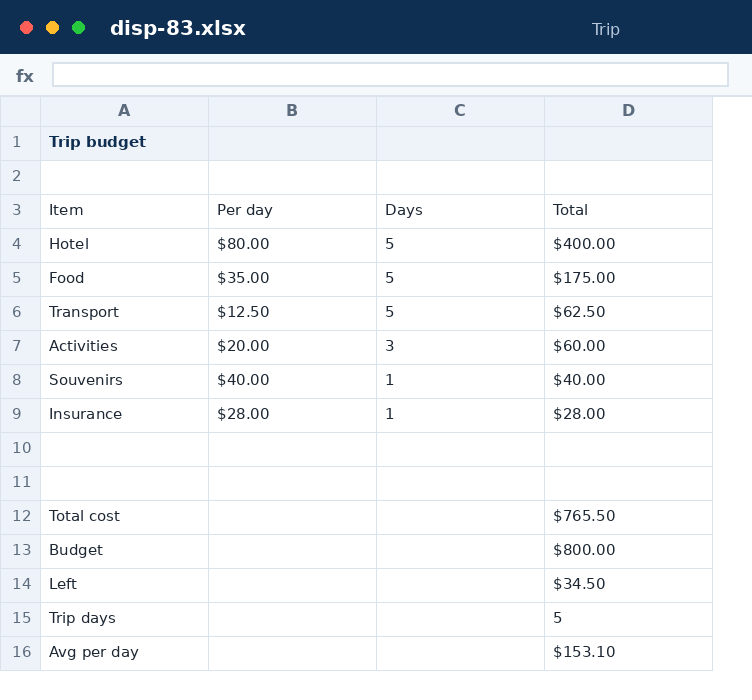
The Trip sheet has a row per item with the cost per day, the number of days and the total. Total is =ROUND(B4*C4,2). Total cost is =SUM(D4:D9), and left is =D13-D12, where D13 holds your budget. Average per day is =ROUND(D12/D15,2), where D15 holds the trip days. For a one-off cost, enter 1 as the number of days.
In the sample, the trip costs $765.50. Against an $800.00 budget, $34.50 is left. Over 5 trip days, the average is $153.10 per day.
Change the length of the trip
Hotel is the biggest cost at $400.00 for 5 days. Change the days on the Hotel, Food and Transport rows to 4 and the total drops at once. Remember to change the trip days cell too, or the daily average will be wrong.
How to use it
1. Download the xlsx and upload it to Google Drive, or open it in Excel. 2. Replace the sample items with your own. 3. Enter the cost per day and the days for each. 4. Type your budget and the trip days. 5. Read what is left and the average per day.
Related
Pack with the travel packing list, save for the trip with the savings goal tracker and see your monthly money in the free Google Sheets budget template.
Download the free vacation budget
The bottom line
Price each item per day, add the one-off costs and compare the total with your budget before you book.