

Forgetting a charger is annoying. Overweight luggage costs money at the airport. One list with a packed status and a weight total helps with both. The items and weights below are made up for the example.
How the travel packing list works
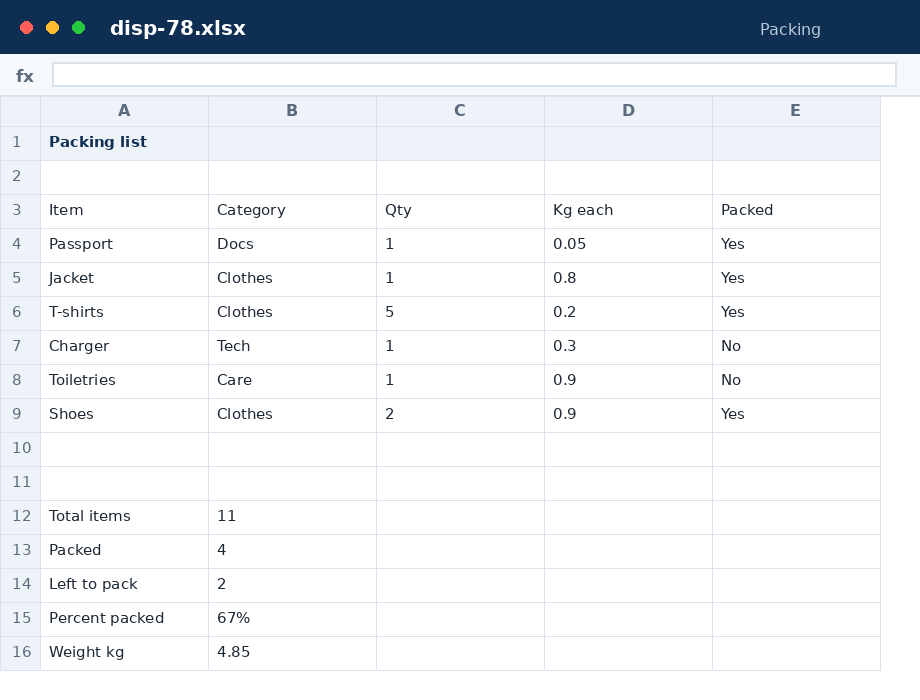
The Packing sheet has a row per item with the category, quantity, weight of one piece in kg and a Packed status of Yes or No. Total items is =SUM(C4:C9). Packed is =COUNTIF(E4:E9,"Yes"), and left to pack uses the same formula with "No". Percent packed is =ROUND(B13/COUNTA(A4:A9),2), formatted as a percentage. Weight is =SUMPRODUCT(C4:C9,D4:D9), which multiplies quantity by weight on each row and adds the results.
In the sample, the list has 11 items in 6 rows. Four rows are packed and 2 are left, so the list is 67% packed. The total weight is 4.85 kg.
Count rows, not pieces
The packed count and percent work on rows. A row such as T-shirts with a quantity of 5 counts once. The total items cell counts every piece, which is why it shows 11 while the list has 6 rows.
How to use it
1. Download the xlsx and upload it to Google Drive, or open it in Excel. 2. Replace the sample items with your own. 3. Add the quantity and the weight of one piece in kg. 4. Set Packed to Yes as you pack. 5. Compare the weight total with your airline's baggage limit.
Related
Moving house instead? Use the moving checklist. Planning an event? Try the event budget template. Set the trip spending in the free Google Sheets budget template.
Download the free packing list
The bottom line
Write the list once, tick items as you pack and check the weight before you leave. Copy the file for your next trip.