

Moving has many small jobs, and the ones you forget are the ones that cost you. One list with a status for each task keeps the whole move in view. The tasks and costs below are made up for the example.
How the moving checklist works
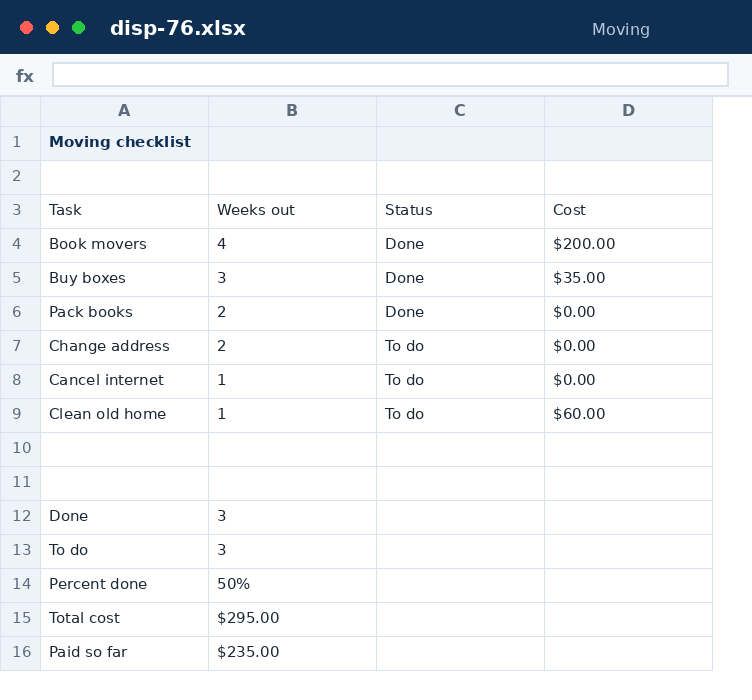
The Moving sheet has a row per task with the weeks before the move, a status of Done or To do, and a cost. Done is =COUNTIF(C4:C9,"Done") and To do uses the same formula with "To do". Percent done is =ROUND(B12/COUNTA(A4:A9),2), formatted as a percentage. Total cost is =SUM(D4:D9), and paid so far is =SUMIF(C4:C9,"Done",D4:D9).
In the sample, 3 of 6 tasks are done, which is 50%. The total cost is $295.00, and $235.00 has been paid so far, so $60.00 is still to come for the cleaning.
Start with the long-lead tasks
Booking movers and changing your address take the longest, so they sit at the top of the sample with the most weeks out. Sort your own list by the Weeks out column to see what needs attention first.
How to use it
1. Download the xlsx and upload it to Google Drive, or open it in Excel. 2. Replace the sample tasks with your own. 3. Set the weeks before the move and a cost, or leave $0.00. 4. Change the status to Done as you finish each job. 5. Add rows and extend the ranges, for example C4:C20.
Related
Plan each week with the weekly planner and see the whole month in the free Google Sheets budget template. Bringing a pet along? Use the pet expense tracker.
Download the free moving checklist
The bottom line
Put every task on one list and mark it as you go. You will see what is left and what it costs.