
Pet costs add up in small pieces: a bag of food, a toy, a visit to the vet. Without a list it is hard to know the monthly total. The items and prices below are made up for the example.
How the pet expense tracker works
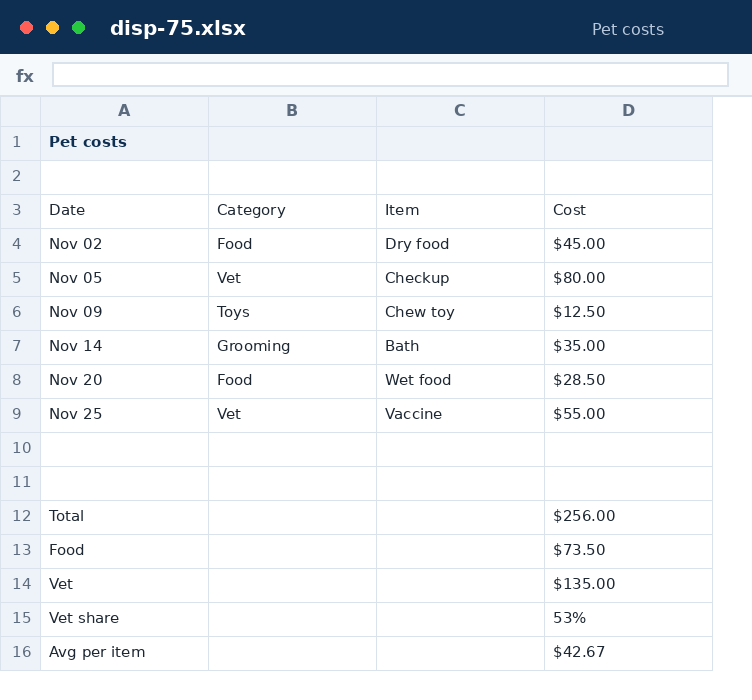
The Pet costs sheet has a row for each purchase with the date, category, item and cost. Total is =SUM(D4:D9). Food is =SUMIF(B4:B9,"Food",D4:D9), and Vet uses the same formula with "Vet". Vet share is =ROUND(D14/D12,2), formatted as a percentage, and average per item is =ROUND(D12/COUNTA(B4:B9),2).
In the sample month, the total is $256.00. Food costs $73.50 and the vet $135.00, which is a 53% share. The average is $42.67 per item.
Use the same category names
SUMIF matches the text exactly, so "Vet" and "vet visit" count as different categories in the formula. Pick a short list of categories, such as Food, Vet, Toys and Grooming, and keep to it. To add a category total, copy the Vet row and change the word inside the quotes.
How to use it
1. Download the xlsx and upload it to Google Drive, or open it in Excel. 2. Replace the sample rows with your own. 3. Enter each purchase with its category and cost. 4. Read the summary at the bottom. 5. Add rows and extend the ranges, for example D4:D20.
Related
Keep other costs in view with the car maintenance log, the subscription tracker and the free Google Sheets budget template.
Download the free pet expense tracker
The bottom line
Write down each purchase and read the totals once a month. You will know what your pet really costs.