

Wedding costs rise in small steps. A venue deposit here and an extra hour of music there, and the plan no longer matches the bills. Tracking each item against its own limit shows the problem while you can still fix it. All amounts below are made up for the example, so use your own.
How the wedding budget template works
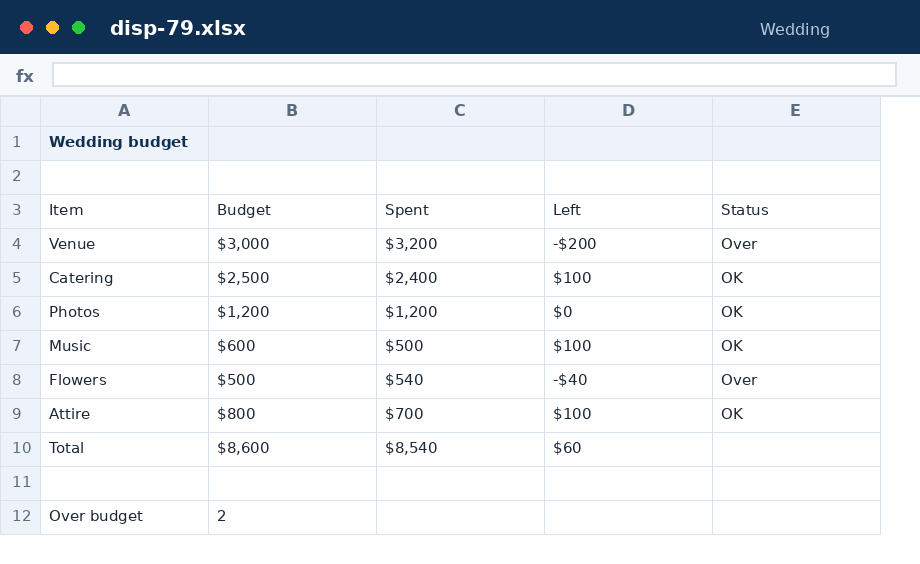
The Wedding sheet has one row per item with a budget, the amount spent, what is left and a status. Left is =B4-C4, so a negative number means you spent more than planned. Status is =IF(C4>B4,"Over","OK"). The Total row uses =SUM(B4:B9) and the same formula for the other columns. The over budget count is =COUNTIF(E4:E9,"Over").
In the sample, the total budget is $8,600 and $8,540 has been spent, so $60 is left. Two items are over: the venue by $200 ($3,200 against $3,000) and the flowers by $40 ($540 against $500).
Read the items, not only the total
The total looks fine because catering, music and attire came in under their limits. The venue is the one to watch, since it is the largest cost and the most over. If you are still choosing vendors, use that gap to decide where to cut.
How to use it
1. Download the xlsx and upload it to Google Drive, or open it in Excel. 2. Replace the sample items with your own list. 3. Set a budget for each item. 4. Enter the real amount in Spent when you pay. 5. Insert new rows above the Total row, then extend the ranges.
Related
Plan the guests with the wedding guest list template, see the event side in the event budget template and manage everyday money with the free Google Sheets budget template.
Download the free wedding budget
The bottom line
Give every cost its own limit and record each payment. You will see which items are over while there is time to adjust.