
A party is many small purchases. Writing them down with a quantity shows the real cost before you spend it. The items and prices below are made up for the example.
How the birthday party planner works
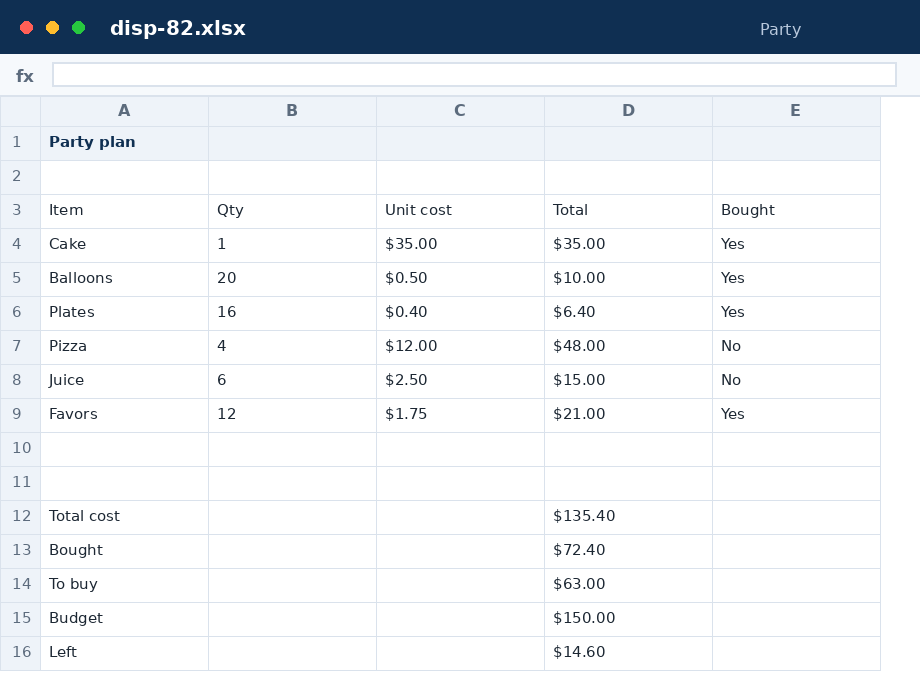
The Party sheet has a row per item with the quantity, unit cost, total and a Bought status of Yes or No. Total is =ROUND(B4*C4,2). In the summary, total cost is =SUM(D4:D9). Bought is =SUMIF(E4:E9,"Yes",D4:D9), and to buy uses the same formula with "No". Left is =D15-D12, where D15 holds your budget.
In the sample, the party costs $135.40. You have bought $72.40 of it and $63.00 is still to buy. Against a $150.00 budget, $14.60 is left.
Plan quantities first
The biggest costs here are pizza ($48.00) and the cake ($35.00). Changing a quantity updates the total at once. If the guest count drops from 16 to 12, change the plates and favors rows and see the new total before you shop.
How to use it
1. Download the xlsx and upload it to Google Drive, or open it in Excel. 2. Replace the sample items with your own. 3. Enter the quantity and the cost of one. 4. Set Bought to Yes when you buy an item. 5. Type your budget in the Budget cell and read what is left.
Related
For bigger events, try the event budget template or the wedding budget template. Buying presents too? Use the holiday gift budget template.
Download the free party planner
The bottom line
Write every item with a quantity, tick it when bought and check the budget before the day. No surprises at the till.