
Small charges add up, and yearly plans are easy to forget until the renewal email arrives. One list fixes that. The services and prices in the sample are made up.
How the subscription tracker works
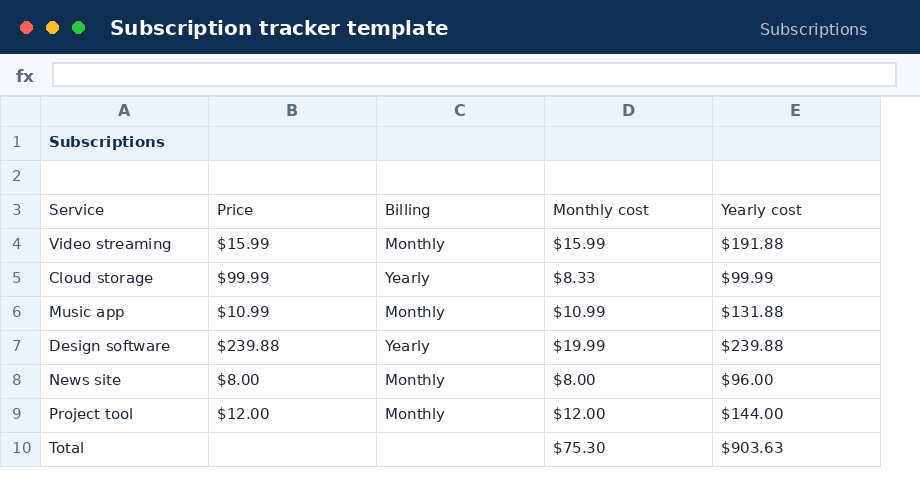
The Subscriptions sheet has Service, Price, Billing, Monthly cost and Yearly cost. Monthly cost is =ROUND(IF(C4="Yearly",B4/12,B4),2), which spreads a yearly price over 12 months. Yearly cost is =IF(C4="Yearly",B4,B4*12). The Total row uses =SUM().
In the sample, six subscriptions cost $75.30 a month in total, which is $903.63 a year. The $239.88 design software plan works out to $19.99 a month. The $99.99 cloud storage plan works out to $8.33 a month, rounded to cents.
How to use it in Google Sheets
1. Download the xlsx and open it with Google Sheets. 2. Replace the sample rows with your subscriptions. 3. Type Monthly or Yearly in the Billing column, spelled exactly like that. 4. Check the totals. 5. Every few months, cancel what you no longer use.
Prices change, so check the real renewal date and price in each service's own account.
Related
Plan the rest of your money with the free Google Sheets budget template. Put the savings to work in the savings goal tracker, or log every cost in the Google Sheets expense tracker.
Download the free template
The bottom line
Look at the yearly total, not the monthly one. $75.30 feels small until you see it is $903.63.