
Setting prices by feel is easy. Setting them by markup is not hard either, but many people mix up markup and margin. They are different numbers, and the sheet shows both. All items and costs below are made up.
How the price list template works
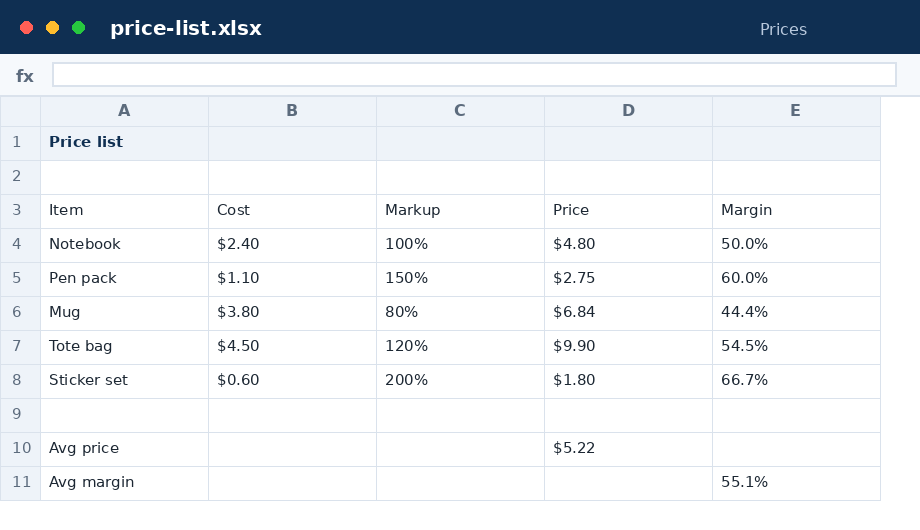
Each row has an item, its cost and a markup. Price in column D is =ROUND(B4*(1+C4),2). Margin in column E is =ROUND((D4-B4)/D4,3), which is profit divided by price.
A notebook that costs $2.40 with a 100% markup sells for $4.80. The markup is 100%, but the margin is 50.0%, because half of the $4.80 price is profit.
Markup and margin are not the same
Markup is measured against cost. Margin is measured against price. That is why the sample gives 100% markup but 50.0% margin for the notebook, and 200% markup but only 66.7% margin for the sticker set at $0.60 cost and $1.80 price. If you want a 50% margin, you need a 100% markup, not 50%.
Across the five items the average price is $5.22 and the average margin is 55.1%. The mug has the lowest margin at 44.4%, so it is the first price to look at.
How to use it
1. Download the xlsx and open it in Excel. 2. Replace the sample items with yours. 3. Enter your real cost for each, including any delivery to you. 4. Set a markup and read the price and margin. 5. Change single markups until the prices work for your customers. Costs and markups here are examples only.
Related
Track what you pay suppliers with the vendor list template. Count stock with the free Google Sheets inventory template, or browse more Excel templates for small business.
Download the free price list
The bottom line
Check the margin before you print the price list. It is the number that tells you what is left after costs.