

Time off is easy to lose track of once a team grows past a few people. A simple tracker answers the question you get asked most: how many days does this person have left? The names and days in the sample are made up.
How the time-off tracker works
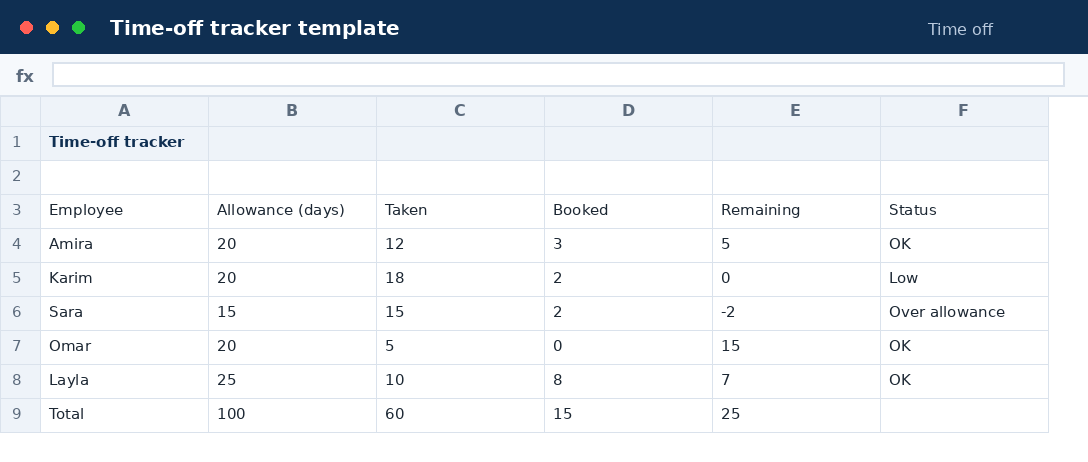
The Time off sheet has one row per employee: Allowance (days), Taken, Booked, Remaining and Status. Remaining is =B4-C4-D4. Status is =IF(E4<0,"Over allowance",IF(E4<=2,"Low","OK")). The Total row uses =SUM().
In the sample, five people have 100 days of allowance in total, with 60 taken and 15 booked, which leaves 25. Karim has 0 days left and shows Low. Sara has booked 2 days more than she has and shows Over allowance, at -2.
How to use it
1. Download the xlsx. 2. Enter each person's yearly allowance. Use the number from your own policy and local rules. 3. Add days to Taken once leave is used. 4. Add approved future leave to Booked. 5. Check Status before you approve a new request.
What this sheet does not do
It tracks days only. It does not carry unused days over, count public holidays or work out pay. For hours and pay, see the payroll sheet below.
Related
Work out pay with the payroll sheet template. Plan the week with the weekly planner template. More files: Excel templates for small business.
Download the free template
The bottom line
Count booked days as well as taken days. That is what stops two people from being away when you need one of them.