
Supplier details usually live in old emails and in someone's head. A simple list fixes that. It also helps when you renegotiate, because you can see who you pay the most and who let you down. All vendors, terms and amounts below are made up.
How the vendor list template works
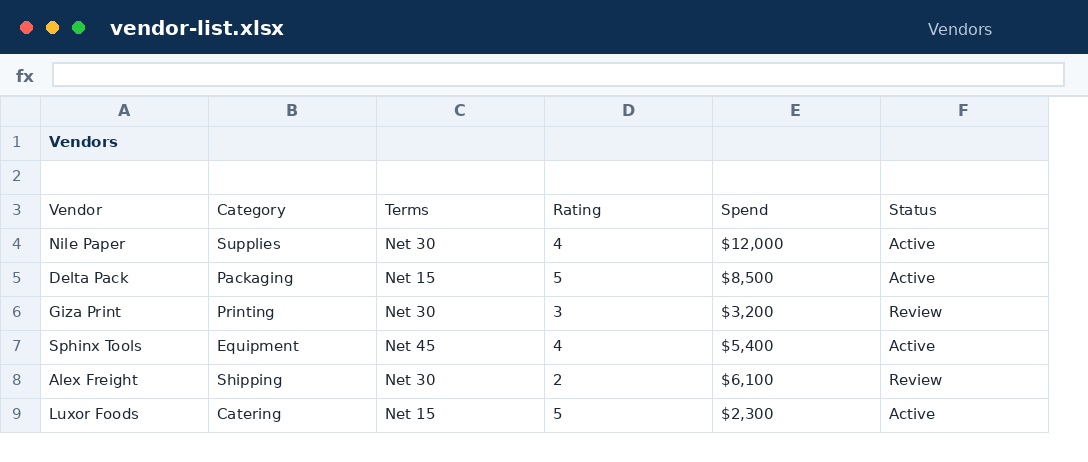
The Vendors sheet has one row per supplier: name, category, payment terms, a rating from 1 to 5, yearly spend and a status of Active or Review. The Summary sheet does the counting. Vendors is =COUNTA(Vendors!A4:A200), and Active is =COUNTIF(Vendors!F4:F200,"Active"). Average rating is =ROUND(AVERAGE(Vendors!D4:D200),1).
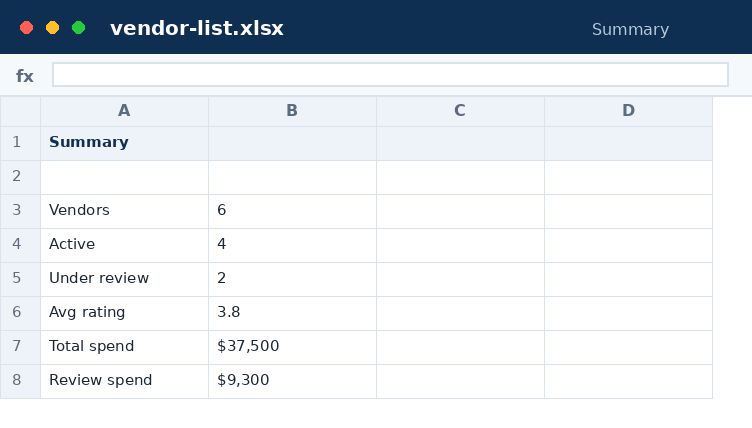
In the sample there are 6 vendors: 4 Active and 2 under review. The average rating is 3.8 and total spend is $37,500.
See the spend you may want to move
The last Summary line uses =SUMIF(Vendors!F4:F200,"Review",Vendors!E4:E200). It adds the spend of every vendor marked Review. In the sample, Giza Print ($3,200) and Alex Freight ($6,100) give $9,300, about a quarter of the $37,500 total. That is the money to look at first when you compare other suppliers.
How to use it
1. Download the xlsx and upload it to Google Drive, or open it in Excel. 2. Replace the sample vendors with yours. 3. Rate each one from 1 to 5 using the same rule every time, for example on price, quality and on-time delivery. 4. Mark a vendor Review when something is wrong. 5. Use exactly the words Active and Review, because the formulas count them.
Related
Keep buyers in the customer list template. Plan what you pay out with the free Google Sheets budget template, or browse more Excel templates for small business.
Download the free vendor list
The bottom line
Review the list once or twice a year. A rating and a spend figure make supplier talks much easier.