
Home upkeep jobs repeat on different schedules, so they are easy to forget. A list that shows what is due keeps small jobs from becoming repairs. The tasks and intervals below are examples only. Check your appliance manuals and local advice for the real schedule.
How the home maintenance checklist works
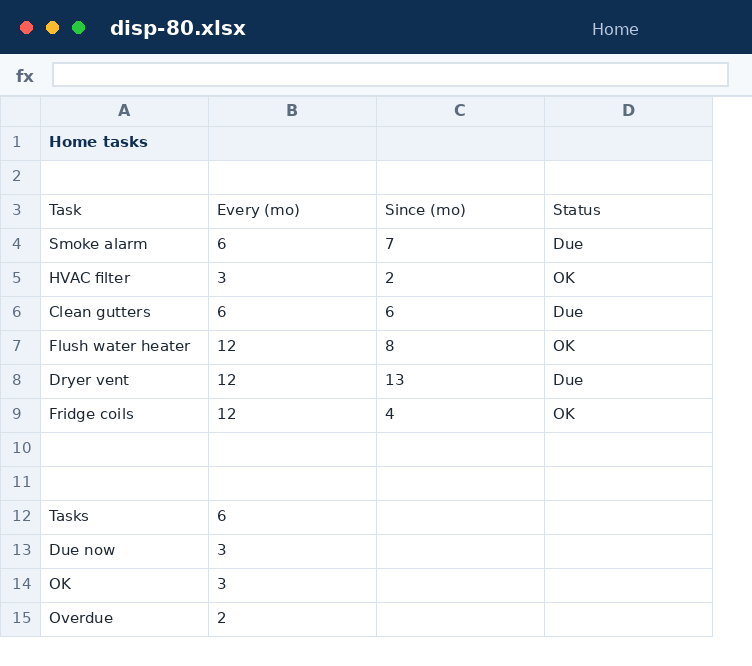
The Home sheet has a row per task with how often it repeats in months, how many months have passed since you last did it and a status. Status is =IF(C4>=B4,"Due","OK"). In the summary, tasks is =COUNTA(A4:A9), due now is =COUNTIF(D4:D9,"Due") and OK uses the same formula with "OK". Overdue is =SUMPRODUCT(--(C4:C9>B4:B9)), which counts tasks where the months since are greater than the interval.
In the sample, 3 of 6 tasks are Due and 3 are OK. Two are overdue: the smoke alarm (7 months against 6) and the dryer vent (13 against 12). The gutters are Due but not overdue, because 6 months equals the 6 month interval.
Due and overdue are different
Due means the interval has been reached. Overdue means it has been passed. Use Due as your prompt to schedule the job, and treat Overdue as the list to do first.
How to use it
1. Download the xlsx and upload it to Google Drive, or open it in Excel. 2. Replace the sample tasks with your own. 3. Set how often each task repeats, in months. 4. Update the months since each time you check the sheet. 5. After doing a task, set its months since back to 0.
Related
Keep the car in shape with the car maintenance log. Moving soon? Use the moving checklist. Plan the work into your week with the weekly planner.
Download the free home checklist
The bottom line
Write each task with its interval and let the sheet show what is due. Do the overdue ones first.