
An allowance teaches more when a child can see where the money went. A simple weekly table shows the balance growing or shrinking. The amounts below are made up. Use whatever suits your family.
How the kids allowance tracker works
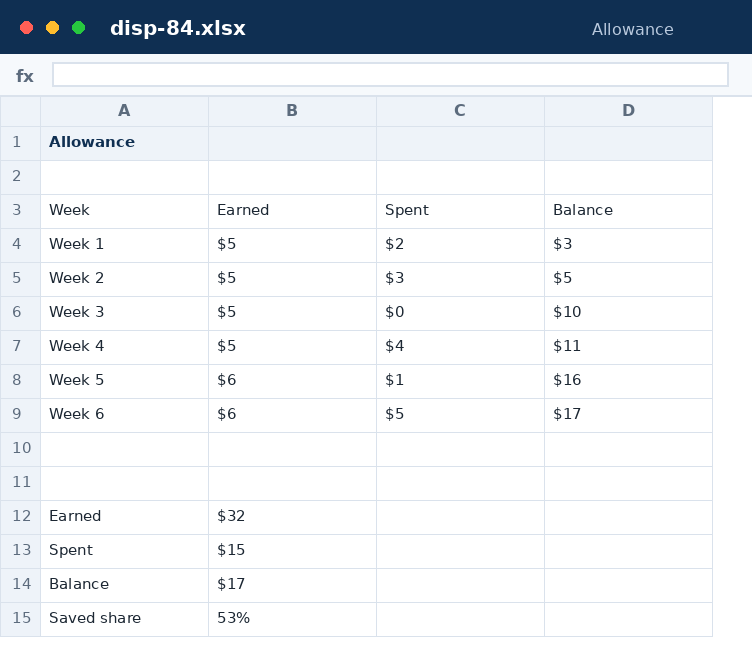
The Allowance sheet has a row per week with earned, spent and balance. The first balance is =B4-C4. Each later week is =D4+B5-C5, which is last week's balance plus earned minus spent. The summary uses =SUM(B4:B9) for earned and the same formula for spent. Balance is =B12-B13 and saved share is =ROUND(B14/B12,2), formatted as a percentage.
In the sample, the child earned $32 over 6 weeks and spent $15. The balance is $17, so 53% of what was earned has been saved.
Let them fill it in
Older children can enter their own numbers each Sunday. Week 3 shows $0 spent, which is a good moment to talk about what they are saving for. Week 6 shows $5 spent, nearly all of that week's allowance, and that is a good chat too.
How to use it
1. Download the xlsx and upload it to Google Drive, or open it in Excel. 2. Enter the amount earned each week. 3. Enter what was spent. 4. Check that the balance matches the money in the jar. 5. Copy the sheet to start a new block of weeks.
Related
Work toward a goal with the savings goal tracker, build chores into routines with the habit tracker and plan the week with the weekly planner.
Download the free allowance tracker
The bottom line
A weekly table of earned, spent and balance is enough to start the money talk at home.