
A study plan only helps if you compare it with what really happened. Two columns, planned and done, make the gap easy to see. The subjects and hours below are made up for the example.
How the study schedule template works
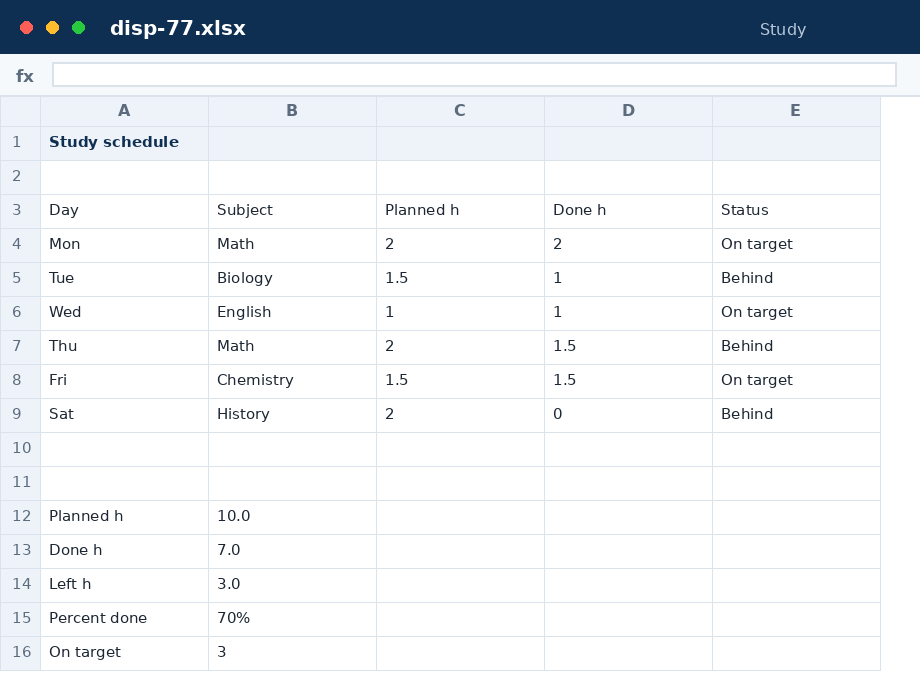
The Study sheet has a row per day with the subject, planned hours, done hours and a status. Status is =IF(D4>=C4,"On target","Behind"). In the summary, planned hours is =SUM(C4:C9), done hours is =SUM(D4:D9) and hours left is =B12-B13. Percent done is =ROUND(B13/B12,2), formatted as a percentage, and the on target count is =COUNTIF(E4:E9,"On target").
In the sample week, 10.0 hours were planned and 7.0 were done, so 3.0 hours are left and the plan is 70% done. Three of the six days are On target: Monday, Wednesday and Friday.
Use the gap, not the guilt
Saturday shows 0 hours done for History. That is a clear sign to move those two hours to another day instead of dropping the subject. A visible gap is easier to fix than a vague feeling of being behind.
How to use it
1. Download the xlsx and upload it to Google Drive, or open it in Excel. 2. Replace the sample subjects with your own. 3. Enter the hours you plan for each day. 4. After studying, enter the real hours in Done h. 5. Read the status and the summary, and adjust the next week.
Related
Plan the whole week with the weekly planner, build the routine with the habit tracker and keep your marks in the grade tracker.
Download the free study schedule
The bottom line
Plan the hours, record the hours and compare them. Small gaps are easy to fix when you see them early.